Pick up where you left off
On Linux and Mac, default panes use persistent tmux sessions. On Windows, close the window to keep terminals running in the system tray; exiting the app stops them.
Konatus Research Group / Desktop software
Bring your shells, coding agents, and running tasks into one organized window. Keep sessions running. See what needs your attention.
Windows · Linux · macOS
Free for personal and commercial use
Built for parallel work
On Linux and Mac, default panes use persistent tmux sessions. On Windows, close the window to keep terminals running in the system tray; exiting the app stops them.
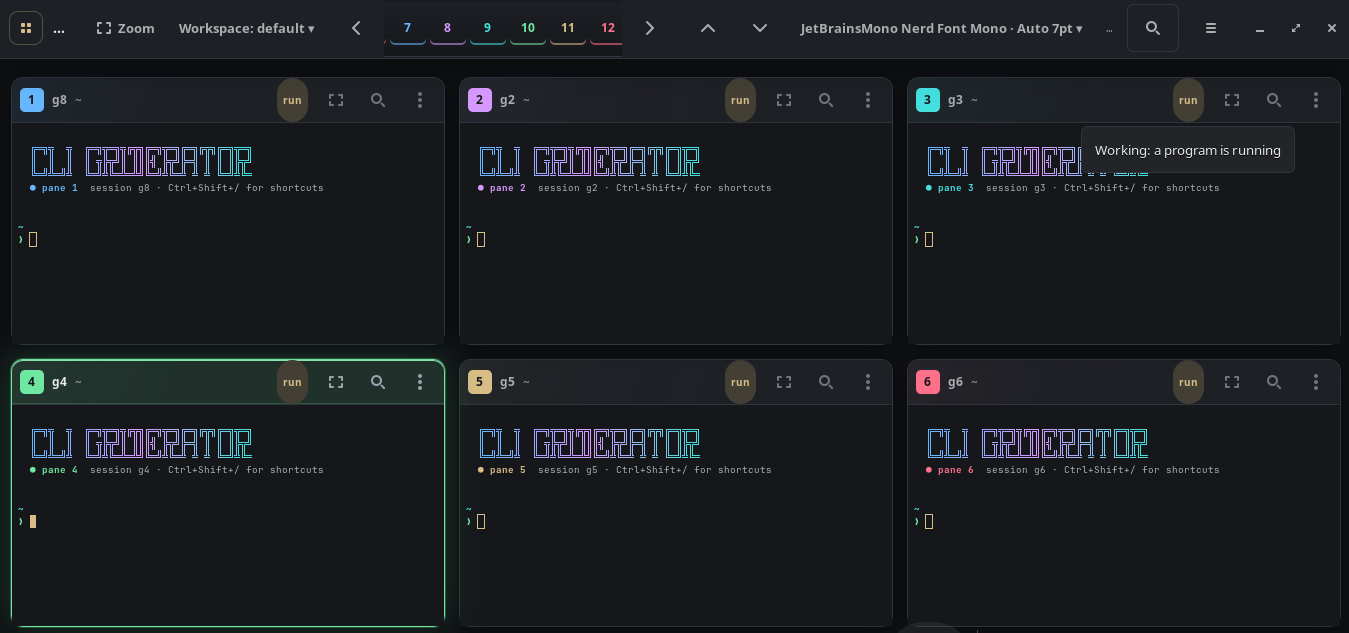
Bell alerts, activity indicators, and detected input prompts bring important changes into view. Jump between panes from the keyboard.
Save the current workspace, create a named copy, or rename it from the workspace menu. Choose a layout or zoom into one task. Linux and Mac also support stacked pane tabs. The command palette puts actions, themes, and workspaces within reach.
Linux & Mac / From the command line
Focus a pane, send text, capture output, or wait for a pattern. Use the event stream to follow activity across your workspace.
Start with a few commands# Bring pane three into focus
cligrid focus 3
# Wait for output from pane one
cligrid wait 1 --until "ready" --timeout 60
# Follow terminal events
cligrid eventsMeasured on a real desktop
We opened twenty Cli Griderator panes and compared their memory use with twenty Kitty windows running the same idle shell workload. Griderator used less process RAM in both comparisons, including Kitty’s mode that shares one application process across separate windows.
92.7 MiB total proportional RAM.
One grid window with twenty running terminal sessions.
1,255.6 MiB total proportional RAM.
Griderator used 92.6% less RAM in this comparison, saving about 1.14 GiB.
219.2 MiB total proportional RAM.
Griderator used 57.7% less RAM in this comparison, saving about 126.5 MiB.
Tested on Pop!_OS 24.04 with COSMIC / Wayland, using a local Cli Griderator 4.1.0 build and Kitty 0.48.2. Results apply to these tested builds and this machine; they are not measurements of every downloadable release or operating system. MiB means 1,048,576 bytes.
The scrolling grid shows only several panes at once. The remaining panes sit below the visible area, but their terminal sessions continue running. Before taking measurements, we checked that Griderator reported twenty panes, inspected pane twenty in zoom view, returned to the full grid, and verified every pane position from one through twenty.
Each of the five memory samples also verified twenty Bash shell processes and twenty attached tmux clients. The result includes the offscreen panes. This comparison uses twenty terminals in every setup; it is not a six-pane result multiplied into an estimate.
Each terminal ran an idle Bash shell with startup files disabled, backed by its own tmux session. Kitty also used tmux so both applications provided session persistence. All setups used isolated settings, fresh private tmux servers, a 10,000-line scrollback limit with mostly empty history, and a 7-point font. No coding agents, builds, or model workloads were started.
We opened real desktop windows and waited for every terminal client to attach. After settling, we took five process-memory samples roughly one second apart. The figures above are the medians from the fresh twenty-terminal rerun: one completed trial per setup. Earlier three-trial measurements were consistent, with Griderator around 91–92 MiB, independent Kitty around 1,259–1,275 MiB, and shared-process Kitty around 220 MiB.
The totals include the application, its helper processes, the tmux server and clients, and all twenty shells. We used proportional set size (PSS), which divides shared memory between the processes using it. Adding ordinary resident-memory figures (RSS) would count shared libraries repeatedly and exaggerate the cost of multiple processes. The Linux kernel documentation explains PSS and RSS.
For Kitty’s shared-process comparison, we used --single-instance with a separate test instance group. This creates individual desktop windows within one Kitty process, as described in Kitty’s command-line documentation. All test windows and sessions were closed after measurement.
The measured benefit is lower terminal overhead. If you run twenty coding agents, servers, or other programs, those programs still need their own memory. Griderator does not combine their processes or share their model contexts. The percentage saving for a busy workspace will therefore be smaller than the idle-shell percentages above.
These figures measure process RAM, not the complete system cost: compositor allocations and GPU memory are not fully included. Window geometry also differs. Kitty used 70-by-16-cell windows; Griderator used its normal scrolling layout with wider panes, and only some panes were visible at a time. Both setups had twenty live sessions, but they did not display identical arrangements.
This is a local benchmark, not a promise of the same savings on every machine. Shell customizations, terminal contents, long scrollback histories, drivers, and the programs you run can change the result.
Downloads / Version 4.3.0
Now available for Windows. Download the standalone Windows installer or portable ZIP, alongside Linux and Apple Silicon Mac packages. Downloads are hosted on GitHub Releases.
Debian, Ubuntu, Pop!_OS and others
Requires Python 3.10+, GTK3, VTE 0.76+, PyGObject, and tmux.
Debian package: sudo apt install ./cligrid_4.3.0_all.deb. Archive: extract it and run ./install.
Developed and tested on Pop!_OS with COSMIC / Wayland.
Apple Silicon · preview
Requires an Apple Silicon (M-series) Mac running macOS 27.0.1 or newer; Intel Macs are not supported yet. GTK, VTE and tmux are included, so Homebrew is not needed.
Preview build: not Developer ID signed or notarized, so macOS may ask you to approve it under Privacy & Security. See the release notes.
Windows 10 (1903+) / Windows 11 · x64
Native PowerShell and Command Prompt terminals. The offline installer includes the app runtime; no WSL, Python, Node.js, or administrator access is needed.
Run the installer and open Cli Griderator from the Start menu. For the portable ZIP, extract the entire folder and open Cli Griderator.exe.
Unsigned release: Windows may show an unknown-publisher warning. Windows on ARM is not verified. Release notes and platform differences.
Windows sessions: closing the window hides it to the system tray and keeps terminals running. Choose “Exit and stop terminals” to quit. Layouts and settings are saved; running processes and scrollback do not survive exit or reboot. Coding agents and other command-line programs require their own installation.
Windows includes up to twenty panes per workspace, named workspaces, layouts, themes, search, copy/paste, a command palette, and confirmed broadcast commands. Linux/Mac control commands, tmux reconnection after app exit, stacked pane tabs, and custom shortcut editing are not included. The Linux memory measurements above do not apply to the Windows edition.
Linux & Mac / Quick start
Run the environment check, open the grid, and make it your own.
cligrid doctorCheck dependencies and get guidance for anything missing.
cligridStart with six terminal panes. Choose your preferred layout and theme.
cligrid --helpPress Ctrl + Shift + P in the window to open the command palette.
Session persistence applies to tmux-backed panes. Reset and broadcast commands replace sessions; use them when you intend to start fresh. GUI reset dialogs ask for confirmation; command-line requests execute directly.
Your first ten minutes
Start with six panes: one for a coding agent, one for a development server, one for tests, one for Git, and two for shells or logs. Click a pane and use it like an ordinary terminal. Change into your project directory inside each pane that needs it.
Click a numbered pane button to focus it. Drag a pane title onto another to swap their positions. Double-click a title to zoom; use the zoom control again to return. Use the + button to add panes, up to twenty. Extra rows scroll into view.
Open Settings from the ☰ menu to choose your font, size, scrollback, and alerts. Use the command palette to find themes, layouts, and workspace actions. Linux/Mac settings are stored in ~/.config/cligrid/config.json; Windows settings are in %APPDATA%/Cli Griderator/settings.json.
On Linux and Mac, default panes connect through tmux, keeping processes running when the grid closes. On Windows, close the window to hide it to the tray; double-click the tray icon to return. Exiting Windows Griderator stops its terminals. No edition preserves running processes across reboot.
Run these from a terminal after installation. Pane numbers refer to positions in the current grid.
cligrid                 # Open or raise the grid
cligrid focus 3         # Focus pane three
cligrid zoom 3          # Enlarge pane three
cligrid zoom off        # Return to the grid
cligrid panes 6         # Set the pane count (1–20)
cligrid swap 1 3        # Exchange two pane positions
cligrid status         # Inspect the running workspace
cligrid hide           # Hide the window
cligrid show           # Show it again
cligrid restart 3      # Reconnect pane three
cligrid quit           # Close the grid; tmux work continues
cligrid help zoom # Read help for one commandRestart reconnects a pane and keeps its tmux session. Reset ends a session and starts a fresh terminal. cligrid reset 3 resets only pane three; cligrid reset resets every pane.
Run in all panes, also available as cligrid all <command>, replaces the targeted sessions. Use it only when you intend to stop their existing work. GUI reset dialogs ask for confirmation; command-line requests execute directly. Save work before resetting or replacing sessions.
For automation, begin with cligrid help send, cligrid help run, and cligrid help wait. These explain text input, command execution, and waiting for output. Review the destination pane before sending commands to a running shell or agent.
If something gets stuck
For a Linux archive installation, try ~/bin/cligrid doctor; on macOS, try ~/.local/bin/cligrid doctor. If that works, add the corresponding bin directory to PATH in your shell configuration and open a new terminal. On Windows, launch Cli Griderator from the Start menu or the extracted portable folder; these Linux/Mac control commands do not apply.
Run cligrid doctor in the environment where you installed it and address the reported missing dependencies. Linux needs a graphical desktop session; a plain SSH terminal does not provide one. On Windows, check that you have Windows 10 1903 or newer / Windows 11 on an x64 PC. Extract the complete portable ZIP before opening the app. If it is already running in the system tray, double-click its icon.
A command that exits rapidly several times stops retrying and shows Restart and Edit command controls. Check that command and its dependencies before restarting it. For small text, zoom the pane or reduce the number of panes, then adjust the font in Settings. If a font is missing, select one installed on your system.
On Windows, choose “Exit and stop terminals” before running the new installer, or extract a new portable folder. Back up %APPDATA%/Cli Griderator/settings.json; uninstalling retains these settings.
On Linux and Mac, check your installed release with cligrid version. When a new release is available, quit the grid and rerun the same installation method you originally used. Back up ~/.config/cligrid beforehand. Reopen the grid and run cligrid doctor. Avoid mixing the Debian package and per-user archive installs, which can leave different versions on PATH.
Cli Griderator is free for personal and commercial use under its included license. Windows is now available. For questions, get in touch with your operating system, application version, and any error message. Linux and Mac users can also include the results of cligrid doctor.